




Quickteller Bet9ja deposit is one of the easiest ways to fund your account in Nigeria. Many players prefer making a Bet9ja payment via Quickteller because it’s fast, secure and works on mobile, desktop or even at an ATM. If you’re wondering how it works, follow the steps below to credit your Bet9ja Nigeria account in minutes.
How to use Quickteller Bet9ja?
To make a Quickteller Bet9ja deposit, just follow these simple steps:
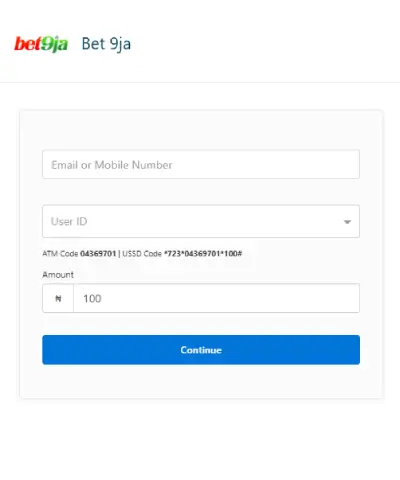
- Open Quickteller and search for Bet9ja in the billers or merchants section.
- Enter your Bet9ja User ID (this is different from your username and can be found inside your account).
- Provide your email, phone number, and deposit amount.
- Review the details and click “Pay”.
- Complete the payment using your card or bank method.
- Once successful, your Bet9ja balance will be credited instantly.
You can also use Quickteller through the mobile app, SMS or directly at an ATM, making it one of the most flexible Bet9ja deposit methods available in Nigeria.
Another essential thing to note is that there is a fee when using this option which can reach up to ₦50. You can learn more about this once you check the T&C.
How to Credit Bet9ja Using Quickteller at an ATM
If you prefer offline payments, you can also complete a Bet9ja ATM Quickteller code transaction. This is useful if you don’t want to pay online.
- Insert your bank card into any Quickteller-supported ATM.
- Select Payments – Quickteller – Pay Bills.
- Search for Bet9ja.
- Enter your Bet9ja User ID and deposit amount.
- Confirm the transaction to credit your account.
Frequently Asked Questions
Can I use Quickteller to fund my Bet9ja account?
Yes, you can use Quickteller to fund your Bet9ja account.
What devices can I use to make the most of the Quickteller Bet9ja option?
You can use all sorts of devices to make the most of the Quickteller Bet9ja option, such as a PC/laptop, a mobile phone, and even an ATM.
Are there any fees when using Quickteller?
Yes, there is a fee when using Quickteller, which can reach up to ₦50.
How to credit Bet9ja using Quickteller?
Open Quickteller, select Bet9ja, enter your User ID and amount, then complete the payment. Your balance is credited instantly.
Can I use a Bet9ja ATM Quickteller code?
Yes. You can deposit at any ATM by selecting Quickteller payments and entering your Bet9ja User ID.
No comments added yet. Be the first!