




Bet9ja is one of Nigeria’s leading betting sites, with a presence not only online but also in betting shops. One of the first questions players are asking themselves after registering is how to deposit money in a Bet9ja account. The truth is, the process is easy when you know the proper steps, and I will describe them in the following paragraphs, while explaining everything you need to know about Bet9ja deposits.
How to Deposit on Bet9ja?
To make a deposit on Bet9ja, you should follow these steps:
- Open Bet9ja’s website on your mobile or desktop device.
- Once ready, you will need to register or use your login details.
- After that, select “Deposit”, and the site will show you all of the deposit options, as well as their processing time.
- When you find the prefered method, select “Continue”. This should give you access to a new window where you can learn whether the payment solution has any limits. You can also enter your desired amount and then complete the deposit.
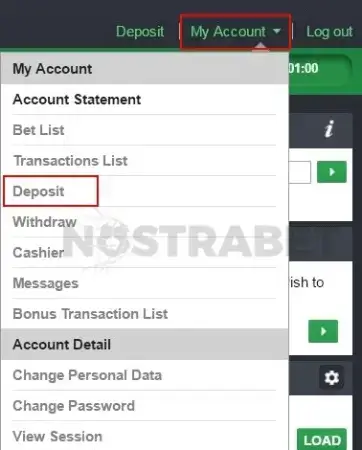
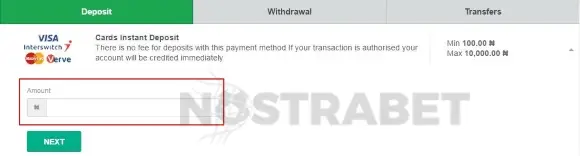
It is essential to know that some payment options found at Bet9ja have their specifics and might require a few extra steps. Fortunately, you can learn more about that before you start using it.
What Deposit Options are Offered by Bet9ja Nigeria?
If you wonder how to make a deposit on Bet9ja, you probably want to know more information about the different payment options. Besides being one of the leading gambling platforms in Nigeria, Bet9ja also offers a wide range of deposit options. Clients can choose from different bank transfers, mobile payments, and more.
You can preview all of them in the following table:
| Payment Method | Deposit Minimum | Deposit Maximum | Time for Deposit |
|---|---|---|---|
 Bank Wire Transfer Bank Wire Transfer | |||
 ATM ATM | ₦100 | Card Dependent | Instant |
 Pocket by Piggyvest Pocket by Piggyvest | ₦100 | ₦1,000,000 | Instant |
 AstroPay AstroPay | ₦100 | ₦1,000,000 | Instant |
 BUDPAY BUDPAY | ₦100 | ₦10,000 | Instant |
 CORALPAY CORALPAY | ₦100 | ₦1,000,000,000 | Instant |
 FIDELITY BANK FIDELITY BANK | ₦100 | ₦100,000 | Instant |
 Flutterwave Flutterwave | ₦100 | ₦100,000 | Instant |
 KORAPAY KORAPAY | ₦100 | ₦1,000,000 | Instant |
 Monnify Monnify | ₦100 | ₦100,000 | Instant |
 PalmPay PalmPay | ₦100 | ₦1,000,000,000 | Instant |
 Shagopay Shagopay | ₦100 | ₦1,000,000 | Instant |
 Squad Squad | ₦100 | ₦100,000 | Instant |
 UBA UBA | ₦100 | ₦100,000 | Instant |
 Unity Bank Unity Bank | ₦100 | ₦100,000 | Instant |
 Zenith Zenith | ₦100 | ₦10,000,000 | Instant |
 FBN FBN | ₦100 | ₦9,999,999 | Instant |
 FCMB FCMB | ₦100 | ₦9,999,999 | Instant |
 GTBank GTBank | ₦100 | ₦9,999,999 | Instant |
 Heritage Heritage | ₦100 | ₦100,000 | Instant |
 Interswitch Interswitch | ₦100 | ₦10,000,000 | Instant |
 OPay OPay | ₦100 | ₦1,000,000 | Instant |
 Paystack Paystack | ₦100 | ₦10,000,000 | Instant |
 Providus Bank Providus Bank | ₦100 | ₦10,000,000 | Instant |
 WEMA BANK WEMA BANK | ₦100 | ₦10,000,000 | Instant |
 9PSB 9PSB | ₦100 | ₦100,000 | Instant |
 EmbassyCard EmbassyCard | ₦100 | ₦1,000,000,000 | Instant |
 fetsWallet fetsWallet | ₦100 | ₦100,000 | Instant |
 First Bank First Bank | ₦100 | ₦10,000,000 | Instant |
 FirstMonie FirstMonie | ₦100 | ₦100,000 | Instant |
 Optimus Bank Optimus Bank | ₦100 | ₦1,000,000,000 | Instant |
Every deposit alternative has its specifics, but the good news is that Bet9ja will let you know what to expect before you start using it.
What is the minimum deposit on Bet9ja?
₦100 is the minimum deposit accepted, with most of the available deposit methods supported by Bet9ja.
What is the maximum deposit limit on Bet9ja?
The maximum deposit limit for a single transaction at Bet9ja varies by method, but it is typically up to ₦10,000,000 for bank transfers and up to ₦100,000 for most other methods.
How to Deposit on Bet9ja with Opay?
Opay is one of the preferred deposit options on Bet9ja, and it offers two options: deposit via the Opay app or an Opay transfer. The steps to complete the transactions are as follows:
- Download the OPay app and log in to your account.
- Select “Betting” and then click on Bet9ja.
- Fill in your details – user ID and amount to deposit, and then confirm.
- The system will return a message with your first and last names and your username. If everything is correct and related to your Bet9ja profile, click “Pay now”.
- The payment is processed immediately, and you will receive a confirmation email.
How to Deposit on Bet9ja with USSD Code?
Deposit via USSD code is useful for players who want to make a transaction directly from their phones, without using any bank apps or wallets. The USSD code is usually connected with a bank account, and it is processed in the following way:
- Open your phone’s dial option and enter the USSD string.
- The correct string is valid in this framework: *BankCode*000*952+WalletID+amount#.
- Submit the USSD code, and you will receive a message on your phone to confirm the details.
- Finally, you should submit your USSD PIN to authorise the payment.
According to Bet9ja’s website, the following bank USSD codes are accepted:
- *901 – Access
- *326 – Ecobank
- *329 – FCMB
- *770 – Fidelity
- *894 – FirstBank
- *737 – GTBank
- *745 – Heritage Bank
- *7111 – Keystone Bank
- *7797 – Rubies
- *909 – Stanbic
- *7799 – Unity Bank
- *822 – Sterling
- *919 – UBA
- *5037 – VBank
- *945 – Wema Bank
- *966 – Zenith Bank
*Note that USSD codes may change, and for actual information, please check with your bank.
How to Deposit on Bet9ja with ATM Card?
ATM deposits are also popular amongst the Nigerian users who play on Bet9ja. The process of depositing via ATM requires that you be near an ATM, have your ATM card with you, and know your unique Bet9ja user ID (it can be found at the top right corner of your account after login).
The steps to complete an ATM Bet9ja deposit are as follows:
- Visit any ATM that have Quickteller/Interswitch enabled.
- Insert your ATM card and enter your PIN.
- Select Quickteller or Pay Bills depending on the ATM device, and then choose your account type.
- Then you should choose a payment option by selecting either “Pay Merchant” or “Others”.
- The device will ask for a Merchant Code, and you need to enter 04226901, which is the Bet9ja code.
- Then, input your customer reference number – this is your Bet9ja ID number.
- Write the amount you wish to deposit and then enter your phone number. Then select “Proceed”.
- Lastly, you will receive confirmation of the payment and whether it was successful.
How to Deposit on Bet9ja with PalmPay?
PalmPay offers two ways to deposit funds on Bet9ja: via their app and via a Palmpay transfer.
To deposit funds via the PalmPay app, you should first download the mobile app and create your login. After that, follow these steps:
- Click the betting icon on the app’s homepage.
- Select Bet9ja from the biller list and insert your details like your User ID and the amount you wish to deposit.
- Confirm your details, then pay from your wallet by entering your transaction PIN.
- Once the transfer is done, you will receive a confirmation message.
If you prefer to do a Palmpay bank transfer, head into the deposits page in your Bet9ja profile, select the option to pay with PalmPay transfer and add the necessary details for the transaction.
How to Deposit Money in a Bet9ja Account via Quickteller?
Quickteller deposits are also popular for Bet9ja customers. The steps to complete such transactions include:
- Visit Quickteller’s website and choose to deposit on Bet9ja.
- Write your unique User ID and also add your email, mobile number and the amount you want to deposit.
- Quickteller’s system will get your information, and then you need to verify the details and pay.
- You will receive a payment receipt and an email notification for the transaction that is done immediately.
We have a complete guide on making a Bet9ja payment via Quickteller, with more details.
Frequently Asked Questions
How to deposit on Bet9ja with Airtime?
Currently, Airtime is not an available deposit option on Bet9ja.
How to deposit on Bet9ja with Access Bank?
Access Bank deposits on Bet9ja can be made via the USSD code *901 for this bank.
Can I make a deposit at Bet9ja on the go?
Yes, you can make a deposit at Bet9ja on the go.
How much can I deposit on Bet9ja?
The maximum deposit amount per transaction depends on the payment option you’ve chosen, but usually reaches up to ₦10M for bank transfers and ₦100,000 for others.
No comments added yet. Be the first!