


 Scan QR code to download
Preview of the BetXchange app Interface
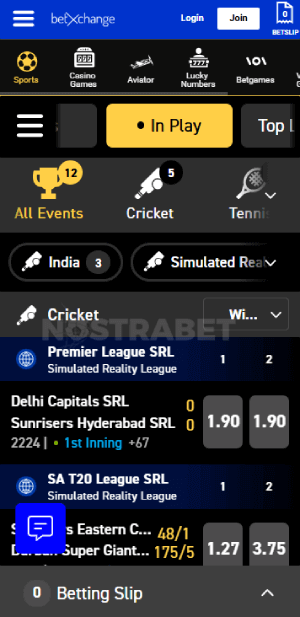
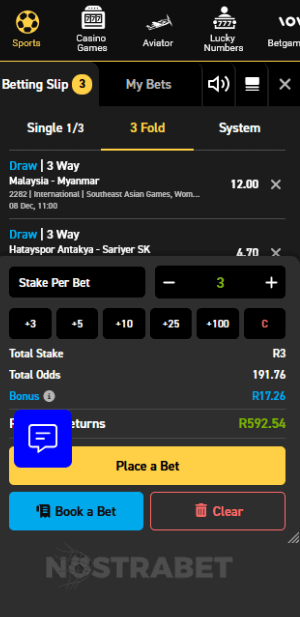
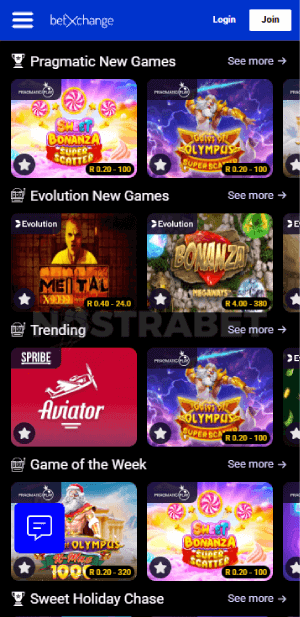
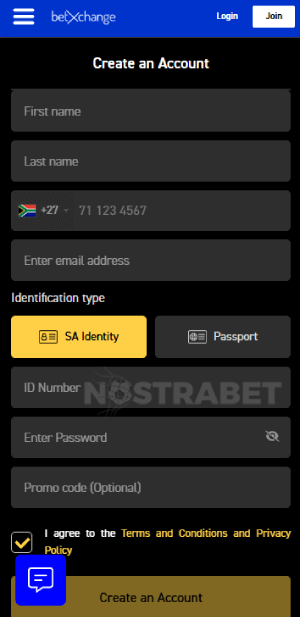
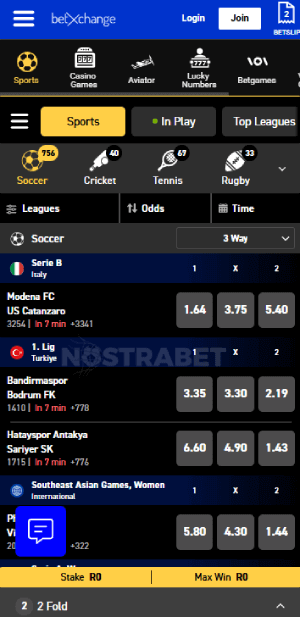
BetXchange keeps pace with the current wave of mobile gaming, offering South African punters the opportunity to enjoy gambling apps. According to a survey, 75% of punters prefer gambling online via their smartphones, while another 25% of the respondents prefer PCs. (source)
Certainly, BetXchange is riding on this mobile gaming popularity to not only meet its punters’ needs but also to offer them a convenient gambling experience.
From my interaction with BetXchange, it is clear that their commitment is to offer players a comfortable experience. Downloading Android and playing via iOS is simple.
BetXChange Sports Betting App for Android
If you use an Android device, you will find an app at BetXchange. This app offers a great betting experience across all verticals. Additionally, the current version of the app provides support services, including contacting support, exploring various payment gateways, and accessing social media support in case you have any questions.
Currently, the available version of the BetXchange app is standard, and its size is 4.3MB. The installation process is straightforward and takes approximately 3 minutes. Additionally, the app is not very demanding, which makes it work on many Android phones.
Downloading and Installing the BetXChange Android App
Although the Android version of BetXchange is available for download, you won’t find it at the Google Play Store. It is only available at the bookmaker’s website.
Follow the guide below to download and install the Android app:
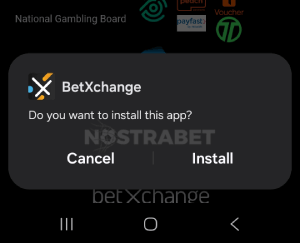
- First, load and log in to your BetXchange account.
- Scroll to the footer of the bookmaker site and click on the Android app icon.
- Immediately, the app will start downloading on your device.
- After downloading, locate the file and click on it to start the installation process.
- However, ensure you have enabled installation from unknown sources.
- Lastly, the BetXchange app will be installed, and you will be notified once the process is complete.
The next step is to log in or sign up by entering your details and enjoy a BetXChange bonus.
Under settings, you can customize the BetXchange app download to meet your needs. These include language settings, enabling push notifications, and setting your odds as you like. You can access the settings knob via the main hamburger menu.
The process of installing the Android BetXchange app was straightforward and relatively automatic.
Is there a BetXChange Sports Betting App for iOS?
No. There is no BetXchange app download for iOS.
However, this doesn’t mean that iOS punters will miss out on the fun and convenience of mobile gaming. Instead of the app, the punters can directly access the mobile site via Safari browser and enjoy all the available betting services.
How to Add a BetXChange Shortcut to the Home Screen of Your iOS Device?
Since the iOS app is not available at the App Store, you can only access the BetXchange website via your mobile browser on iOS devices.
Luckily, you can create a shortcut to the betting site on your mobile screen. Thus, you will always be able to access the platform with a single click, just like those who use the app itself.
Follow the steps below to create a BetXchange shortcut on your iOS device:
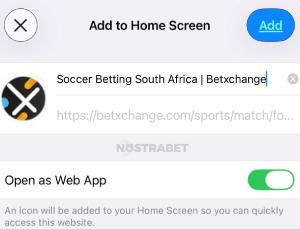
- Open the Safari browser for a fast BetXchange login.
- At the top right corner of your screen, click the three dots.
- Moreover, scroll down the menu and choose ‘Add to home screen’.
- Come up with a name for the shortcut you just created before having it on your screen.
- Lastly, complete the process by clicking the ‘Add’ button.
Creating the shortcut on my mobile device was a bit hard for me. However, I figured it out.
BetXChange Mobile Site
In addition to playing at BetXchange via the app, I have also tested the site using the mobile website and desktop. I have carefully compared the experiences, and all three access points offer similar functionalities.
However, a careful comparison shows a few differences, primarily in the structure and outlook of the site. For example, the arrangement of the menu and betting verticals differs slightly between mobile and desktop sites.
Despite the small differences, there are many similarities. These cut across the functionalities of the bookmaker, including payment methods, customer support contacts, betting options and markets, and the sizes of the odds.
Clearly, the mobile site, which is primarily designed for users without the app, serves as a hub of convenience, as do the desktop and the app.
BetXChange Mobile Pros & Cons
From our expert observation, we came up with the list of BetXchange pros and cons below:
- Pros
- Simple to install
- Offers a full range of betting services at the desktop site
- Small in size, taking up little of your phone storage space
- Fast withdrawals
- Cons
- No downloadable app for iOS punters
- The Android app requires you to change your phone’s security settings
BetXChange Mobile Payment Options
The convenience of betting at BetXchange doesn’t stop at the mobile app! You will also find it in the range of payment gateways available at the platform. Undoubtedly, you will have several payment methods to choose from. These include vouchers, bank cards, and e-wallets.
Payment methods available at the site include 1 Voucher, OTT, Ozow, EFT Secure, and MasterCard, among others.
In addition to the many payment options, you will also enjoy generous money transfer limits and short processing times.
| Payment Method | Deposit Minimum | Deposit Maximum | Time for Deposit |
|---|---|---|---|
 Ozow Ozow | R10 | R100 000 | Instant |
 ApplePay ApplePay | R10 | R100 000 | Instant |
 Capitec Pay Capitec Pay | R10 | R100 000 | Instant |
 Visa Visa | R10 | R100 000 | Instant |
 MasterCard MasterCard | R10 | R100 000 | Instant |
 EFT (Electronic Fund Transfer) EFT (Electronic Fund Transfer) | R10 | No Limit | Instant |
 1VOUCHER 1VOUCHER | R10 | R1500 | Instant |
 OTT Vouchers OTT Vouchers | R10 | R5000 | Instant |
 Blu Voucher Blu Voucher | R2 | R1000 | Instant |
 Samsung Pay Samsung Pay | R10 | - | Instant |
 Masterpass Masterpass | R10 | - | Instant |
 Shoprite Shoprite | - | - | - |
| Payment Method | Withdrawal Minimum | Withdrawal Maximum | Time for Withdrawal |
|---|---|---|---|
| Ozow | R100 | R50 000 | up to 24 hours |
| ApplePay | - | - | - |
| Capitec Pay | - | - | - |
| Visa | - | - | - |
| MasterCard | - | - | - |
| EFT (Electronic Fund Transfer) | - | - | up to 48 hours |
| 1VOUCHER | - | - | - |
| OTT Vouchers | R500 | R3000 | Instant |
| Blu Voucher | - | - | - |
| Samsung Pay | - | - | - |
| Masterpass | - | - | - |
| Shoprite | R100 | R50 000 | up to 24 hours |
Conclusion and Overall Opinion
Clearly, BetXchange is making significant moves to offer its mobile punters a seamless experience. It is also a way of ensuring that the platform keeps up with the changes happening in the gambling industry, making it remain relevant and competitive.
Certainly, the app is a huge aspect for many punters. It helps you bet on the go and at any time. You can move with your device around to check for real-time updates. The mobile site also offers these advantages.
Overall, I have tried both the BetXchange app and the mobile site, and they both exceed expectations in user-friendliness.
No reviews added yet. Be the first!